IA que trabaja
In Spain, if you run a business, your customers contact you on WhatsApp. That means answering the same questions over and over: opening hours, prices, whether you have a certain product, or how their order is going.
There are three levels to automating WhatsApp, from the simplest to the most powerful. I'll walk you through them in order, because for many people the first level is enough—there’s no point setting up an AI chatbot if a well-written away message does the job.
Level 1: WhatsApp Business Auto-Replies (Free)
First things first: regular WhatsApp doesn’t have auto-replies. You need the WhatsApp Business app, which is free and installs the same way. You can switch your number from regular WhatsApp to Business without losing your chats.
Once inside, under Business Tools you’ll find:
- Greeting message. Sent only when someone messages you for the first time (or after 14 days without contact). Perfect for saying who you are and what they can ask you.
- Away message. Sent when people message you outside your business hours, or always if you prefer. This is where you get the most benefit: no one is left without a reply at 11pm.
- Quick replies. Saved texts you insert by typing
/and a shortcut. For example,/pricesbrings up your full price list. - Labels to organize chats: new client, pending order, paid.
- Catalog with your products or services and their prices, so customers can see them without asking.
How to Set Up Auto-Replies in WhatsApp Business
- Open WhatsApp Business and go to Settings (or the three dots), then Business Tools.
- Go to Greeting message, turn it on, and write your text.
- Go back and select Away message. Turn it on, write your text, and choose when to send it: always, outside business hours, or at a custom time.
- If you select “outside business hours,” set your hours in your business profile.
An away message that works:
Hello! We're currently closed (we're open Monday to Friday from 9:00 to 14:00 and 17:00 to 20:00).
In the meantime:
· Prices and services: [link to your website]
· Book an appointment: [link]
We'll get back to you as soon as we open.
The key: solve something. “We’re not here, we’ll reply later” doesn’t help anyone; a link to prices and your booking calendar does.
Level 2: The Official WhatsApp Business API
The app has a limitation: auto-replies are always the same text. If you want it to reply differently depending on the question, send appointment reminders, or connect with your calendar or shop, you need the WhatsApp Business API (the so-called Cloud API from Meta).
What changes:
- Your number connects to the API and can no longer be used from the regular mobile app, but from a dashboard or tool instead. (Some solutions let you use both at once; check before migrating.)
- You can send Meta-approved templates: reminders, confirmations, notifications. These templates are charged per message (cents).
- Replying to someone who messages you within 24 hours is not charged per message.
- It can connect to anything: your calendar, online store, a spreadsheet, or AI.
To set this up without coding, tools like n8n or Make have a WhatsApp Business Cloud node:
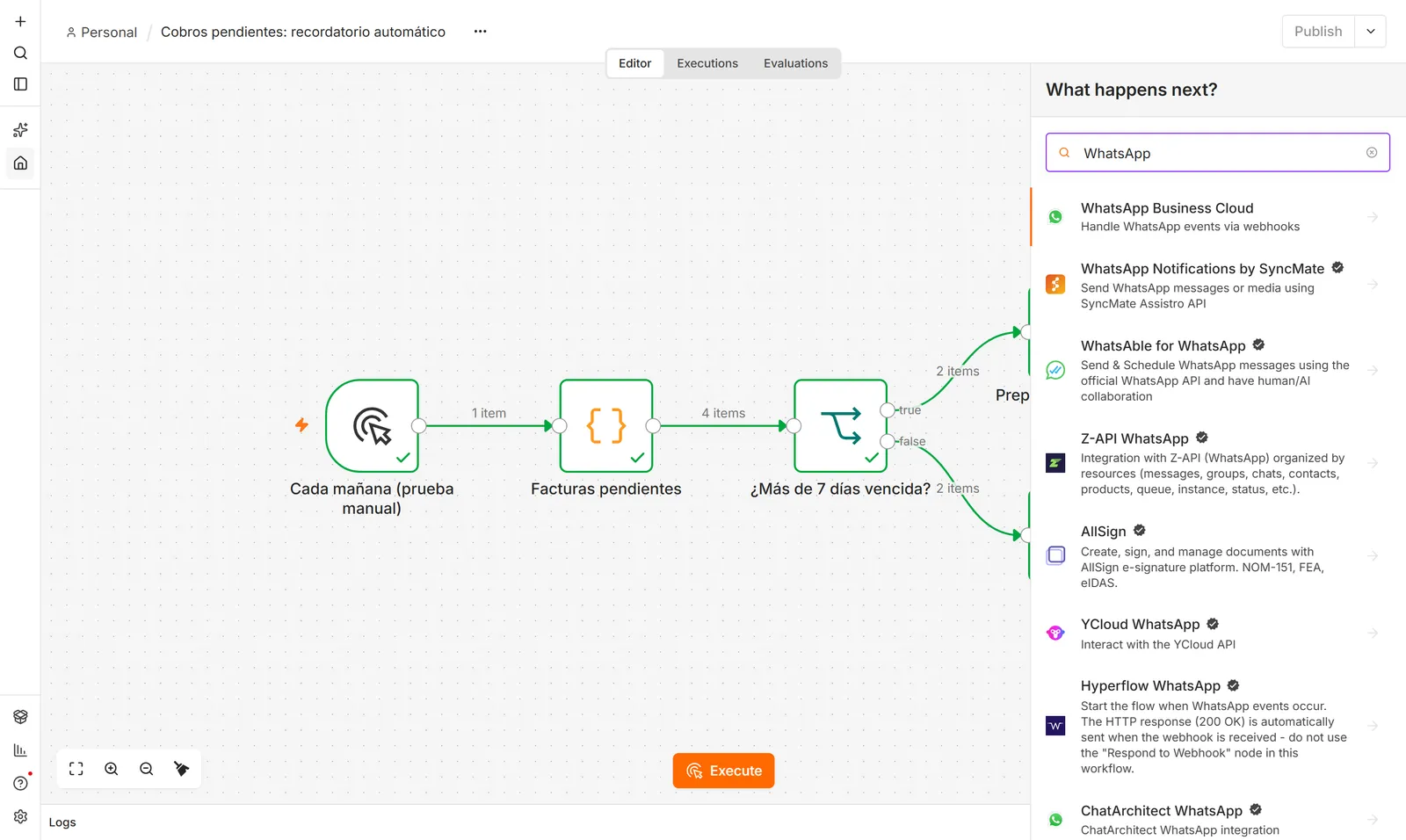
With this, you can set up, for example, appointment reminders the day before or “your order is ready” notifications without writing a single line of code. Step-by-step instructions are in what you can automate with n8n.
Level 3: A WhatsApp Chatbot with AI
Here’s where it gets powerful: an assistant that understands what people ask, even if it’s badly written, and replies with your real data. Not a “press 1 for prices” menu.
The key to making it work well: the AI only gets the data it needs, and anything it doesn’t know is handed off to a person.
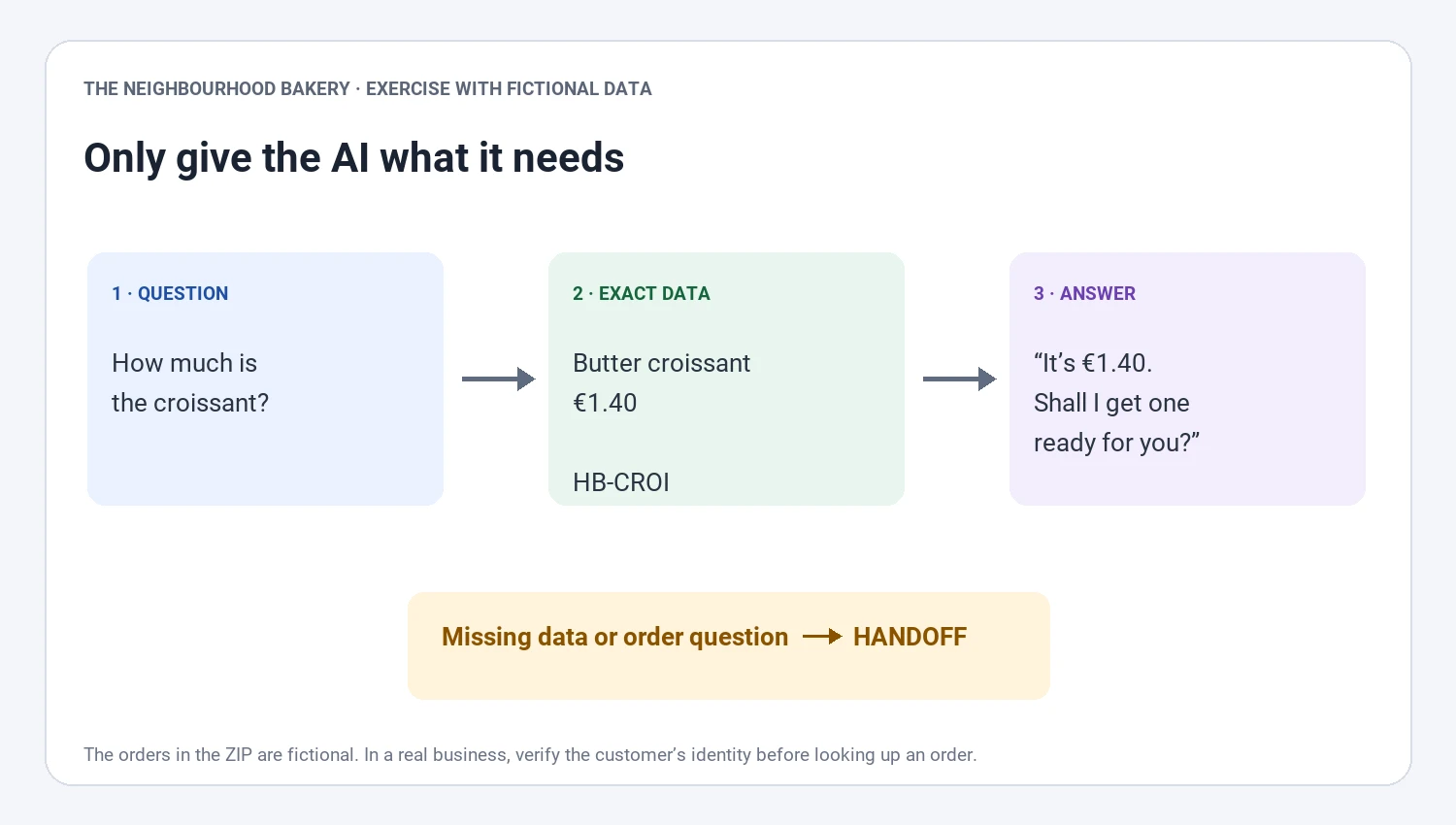
- The question comes in: “How much is the croissant?”
- The system looks up the exact data in your catalog, stock, or calendar.
- The AI drafts the reply with that data and in your tone.
- If the data isn’t there, or it’s a complaint, or something sensitive, it’s handed to a person.
I set this up for a mobile phone repair shop: the bot checks the online store catalog and the POS before replying, and anything it doesn’t know is left in a dashboard where the team can see the full conversation.
What You’ll Need
- The WhatsApp Business API from level 2.
- An AI model (Claude, GPT, or Gemini) via API. For a small business, it’s a few euros a month.
- Your data stored somewhere accessible: your website, a spreadsheet, your store, or your software.
- Something to connect it all: n8n, Make, or a small custom program.
If you’d rather not deal with Meta, templates, and AI, that’s exactly what I do in the WhatsApp AI chatbot for businesses.
What You Should Never Do
- Use “free” bots that connect by scanning a QR code. There are unofficial libraries that mimic WhatsApp Web. They work—until WhatsApp detects the pattern and blocks your number. For a business, losing your number means losing your customers.
- Send marketing messages to people who haven’t asked for them. In Europe, you need their consent, and if you get reported as spam, Meta lowers your number’s quality and you can end up unable to send messages.
- Buy lists of numbers. Nothing more to add.
- Let the bot negotiate, handle complaints, or make promises. The bot gives information; decisions are made by a person.
Summary: Which Level Do You Need?
| If your case is... | You only need |
|---|---|
| People message you outside business hours and you want no one left without a reply | Level 1: away message |
| You always answer the same 5 questions | Level 1: quick replies + catalog |
| You want appointment reminders or order notifications | Level 2: API + n8n or Make |
| Dozens of people message you daily with different questions | Level 3: AI chatbot |
Start with level 1 today. It takes ten minutes and you’ll notice the difference from day one.
Frequently asked questions
How do I set up auto-replies on WhatsApp?
With the WhatsApp Business app: in Business Tools, activate the greeting and away messages, write your text, and choose when it’s sent. Regular WhatsApp doesn’t have this feature.
Can I set up a WhatsApp bot for free?
WhatsApp Business auto-replies are free. A bot that replies based on the question needs the official API, where replying within 24 hours isn’t charged per message but templates you initiate are. Free QR-based bots aren’t official and can get your number blocked.
How much does a WhatsApp AI chatbot cost?
Usage usually costs just a few euros a month for AI and messages. Setup depends on what it needs to access (a catalog, POS, calendar): a simple FAQ bot isn’t the same as one that books appointments.
Can I use WhatsApp Business and the API with the same number?
Traditionally, a number could use either the app or the API, not both. Meta now allows, in some cases, using the app and API at the same time with the same number; check before migrating, as it depends on your country and provider.