IA que trabaja
Make (which was called Integromat until 2022) is a tool for connecting apps and automating tasks without coding. You draw a flow with blocks: when something happens in one app, do this in another. For example, when a new row is added to a spreadsheet, send a notification to your team.
It's the most direct alternative to n8n and to Zapier. At the end of the guide, I'll explain when to choose each one.
The concepts you need
- Scenario: a complete automation flow. This is called a workflow in n8n.
- Module: each block in the scenario. There are three types:
- Triggers: what starts the scenario. "New row in Google Sheets", "new email", "new order in Shopify".
- Actions: do something. "Send a message", "create a contact", "add a row".
- Searches: look up data. "Find customer by email".
- Connection: the permission for Make to use your Gmail, Slack, or other account. You set it up once and reuse it.
- Mapping: taking data from a previous module (like the customer's name) and putting it into another (like the message text).
- Filter: a condition between two modules. If it isn't met, the flow doesn't continue down that path.
- Router: splits the flow into multiple paths.
- Credits: how Make charges. Each time a module runs, it uses credits.
Step by step: notify your team for each new customer
The example: every time someone is added as a potential customer in a Google Sheets spreadsheet, the sales team gets a notification with their details, but only if they're from a specific country.
1. Create the scenario and add the trigger
In Make, Create a new scenario, click the big + in the center and search for the app. For Google Sheets, choose the Watch New Rows trigger: it monitors the sheet and fires for each new row.
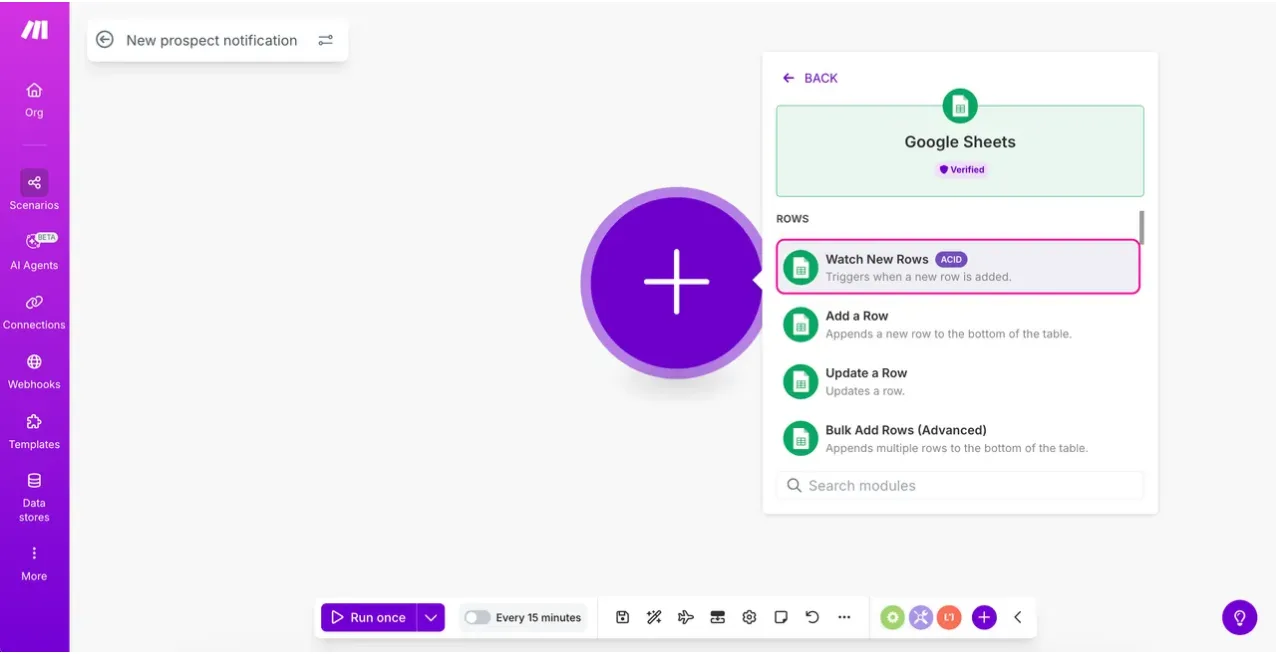
The first time, you'll be asked to create the connection with your Google account. Then you select the sheet and the tab.
2. Add the action
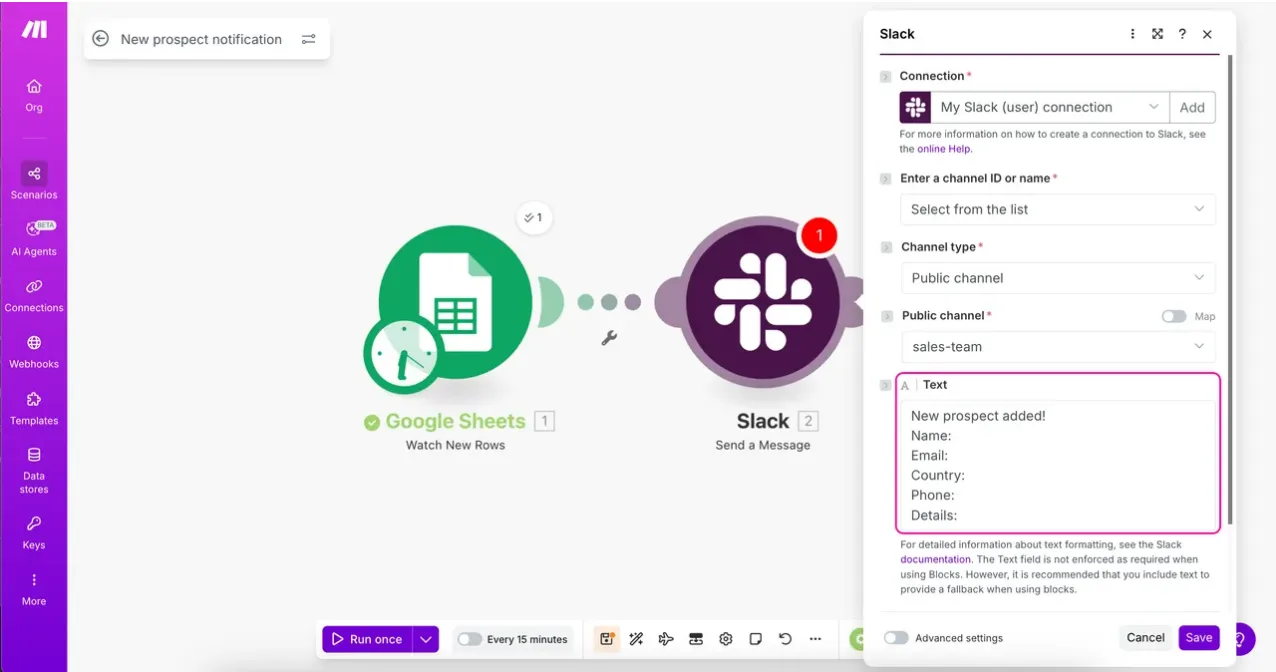
Hover over the right side of the module and another + appears. Add the app where you want the notification (Slack, Telegram, Gmail...) and the action, for example Send a Message.
3. Map the data
This is where Make shines. When you write the message text, a panel opens with the data from the previous module: name, email, country, phone. Drag or click to insert them into the message. When a new row comes in, these fields are automatically filled with that row's data.
4. Add a filter
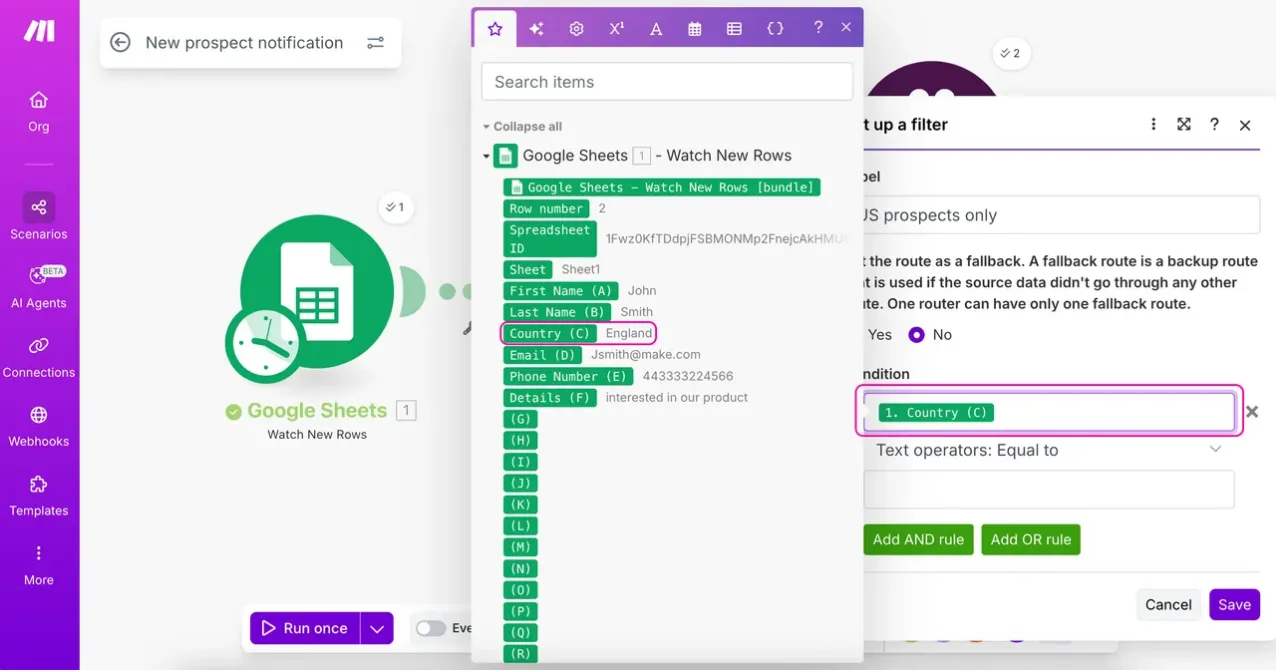
To only notify about customers from a certain country, click the line connecting the two modules and add a filter: "Country equals Spain", for example. You can combine several conditions with AND or OR.
5. Test with "Run once"
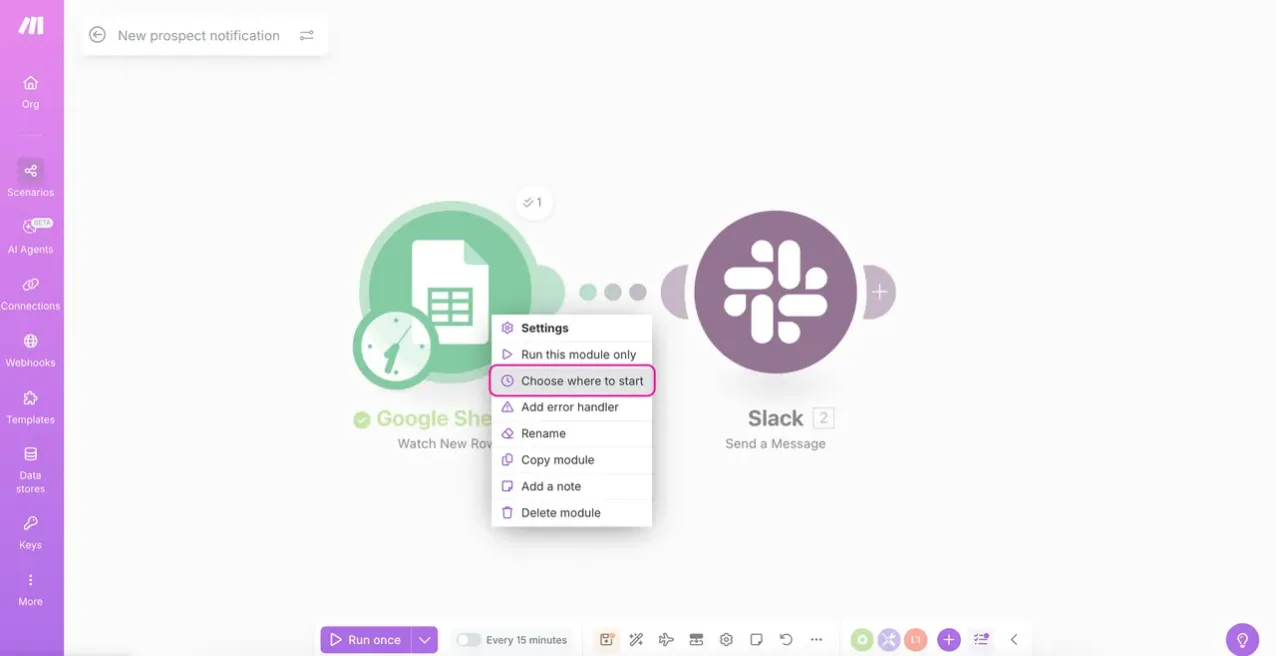
Before activating, click Run once at the bottom left. If the trigger has already seen old rows, you can choose where to start by right-clicking the module (Choose where to start).
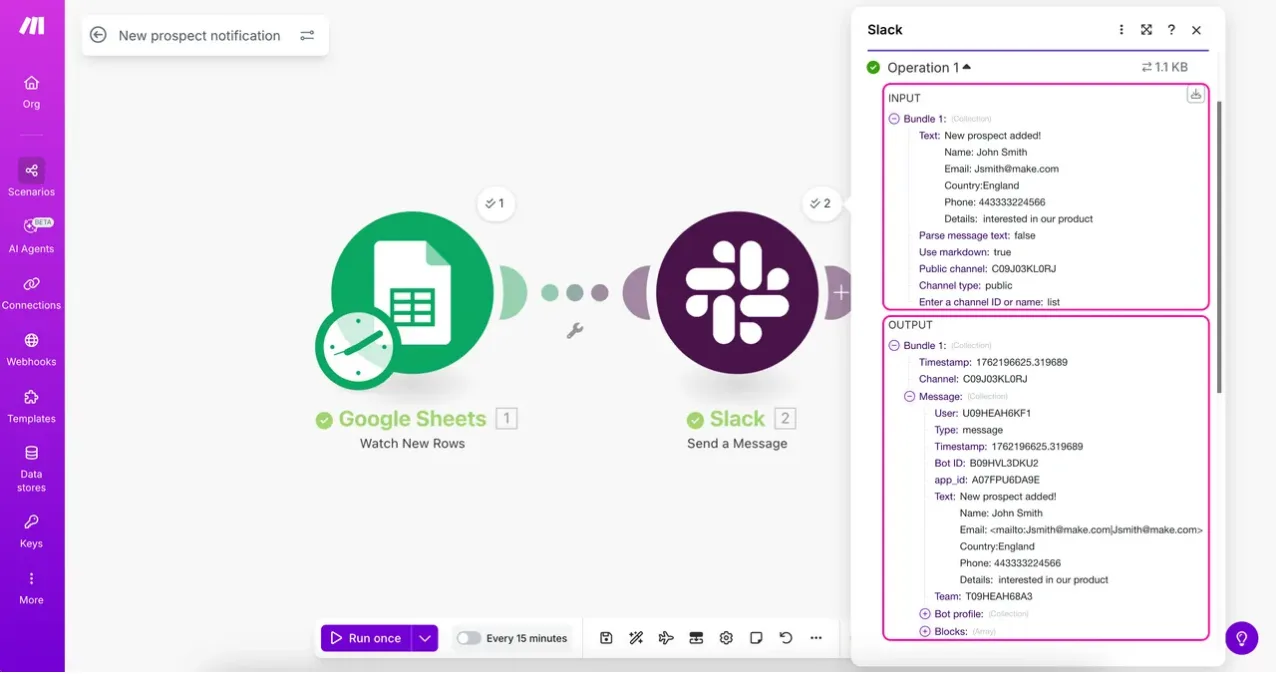
When it's done, each module shows a bubble with what it processed. Click it to see the exact input and output: what data it received and what it returned.
6. Schedule and activate it
At the bottom, choose how often it runs (for example, every 15 minutes) and activate the scenario. From then on, you can see each run in the history: whether it worked and what it did.
What makes Make powerful
- Router: splits the flow into multiple paths with their own filters. For example, customers from Spain to one channel, others to another, and a default route (fallback) for anything that doesn't match.
- Error handlers: what to do if a module fails (retry, ignore, notify you).
- Iterators and aggregators: process a list item by item, or combine many items into one (for example, all the lines of an order into a single table).
- Webhooks: receive data from any service that can send a request, even if there's no built-in module.
- AI: modules for OpenAI, Claude, Gemini, and AI agents within Make itself, to classify, summarize, or write content in the middle of a flow.
- Templates: hundreds of ready-made scenarios on their site (like building a basic WhatsApp chatbot, saving Gmail attachments to Drive...) that you can import and adapt.
How much does Make cost: credits
Make charges by credits. In short, every time a module processes something, it uses a credit; AI modules may use more.
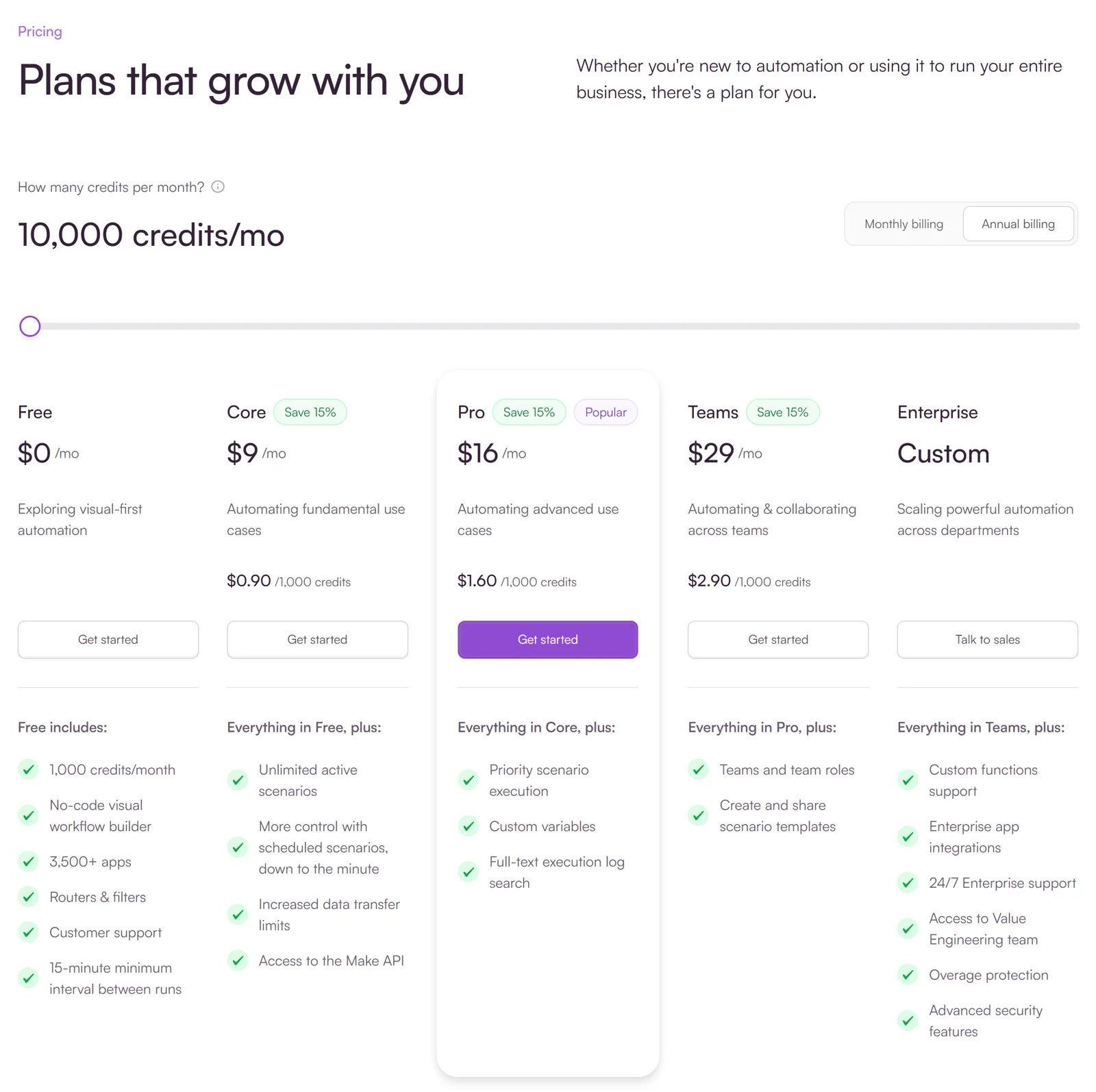
- Free: 1,000 credits per month, full editor, routers and filters, and a minimum interval of 15 minutes between runs.
- Core: from $9/month (billed annually, with 10,000 credits): unlimited active scenarios and runs scheduled to the minute.
- Pro and Teams: higher priority, variables, log search, and team collaboration.
How to estimate your usage: monthly credits ≈ executions × modules per execution. A scenario with 3 modules that runs for 20 rows a day is about 60 per day, around 1,800 per month: over the free plan but well within Core.
Make or n8n
| Make | n8n | |
|---|---|---|
| Getting started | Very easy, all on their website | Easy in their cloud; self-hosting takes some skill |
| Pricing | By credits: cheap for low volume, gets expensive with high volume | Free and unlimited if you self-host |
| Integrations | 3,500+ apps | 1,000+, and any API with HTTP Request |
| AI | AI modules and agents | Very complete: agents, memory, local models |
| Maintenance | None | You, if you self-host |
My rule: few flows, low volume, and no servers → Make. Many flows, high volume, or AI in the middle → n8n on your own server. And if you're already using one and it's working, don't switch just for the sake of it.
If you want to see how this works in n8n, with my own screenshots and a real executed flow, check out what you can automate with n8n. And if you'd rather have me build your flows, that's one of my services.
Scenario ideas for a business
- Website form → CRM → notification to the sales rep.
- Shopify order → invoice in your accounting software → email to the customer.
- Gmail attachments → Google Drive, sorted by supplier and date.
- New Google review → notification if it's less than 3 stars.
- Calendar appointment → WhatsApp reminder the day before.
- Customer email → AI classifies it → draft reply or alert based on type.
- New row in a sheet → product description written by AI → published in your store.
All of these have equivalents in n8n. What changes is where it runs and how you pay.
Frequently asked questions
What is Make?
A platform for automating tasks by connecting apps without coding. You build scenarios with modules that trigger when something happens and perform actions in other apps.
Is Make the same as Integromat?
Yes. Integromat changed its name to Make in 2022. It's the same tool, with many updates since then.
Is Make free?
There's a free plan with 1,000 credits per month and a minimum interval of 15 minutes between runs. Paid plans start at about $9/month billed annually.
Which is better, Make or n8n?
Make is easier to start with and requires no maintenance, but you pay per use. n8n can be self-hosted for free with unlimited runs and is more powerful with AI, but you have to maintain the server.
What is a credit in Make?
The unit Make uses to charge for usage: each time a module processes something, it uses credits (usually one; some AI modules use more). Your plan includes a set number of credits per month.