IA que trabaja
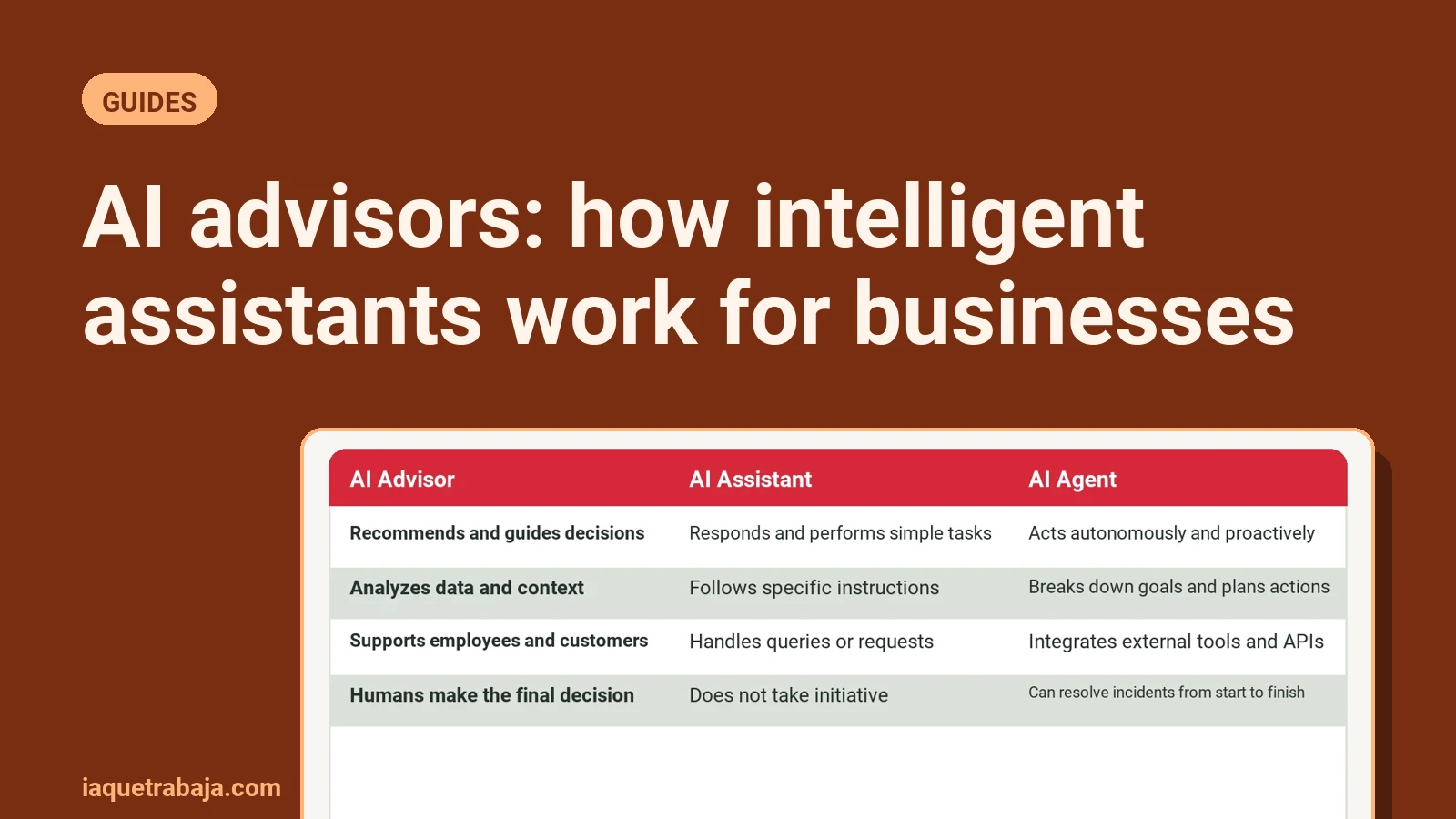
An AI assistant is a reactive system that only performs a specific task when you ask it via a prompt. An AI agent, on the other hand, is proactive and plans a sequence of actions on its own to achieve a goal without you having to guide it at every step. That’s the main difference—and it completely changes how you work.
In this article, I’ll show you exactly what separates these two technologies. We’ll look at what they cost, what risks they really have, and how you can start using them in your daily work without spending a cent.
What is an AI assistant and how does it work?
To understand the difference, you first need to be clear on what an assistant actually does. As IBM defines it, an assistant is a purely reactive system. It usually works through a chat interface. You give it an instruction or prompt, it performs that single action, and gives you a draft or result. That’s it.
If you use tools like ChatGPT in the usual way or have Microsoft 365 Copilot in your work environment (Word, Excel, or Teams), you’re using an assistant. You ask it to summarize a text, and it summarizes. You ask for a draft email, and it writes it. But that’s as far as it goes. The assistant won’t make decisions on its own without you validating each step. It always needs a human instruction.
In my view, assistants are pretty good for desktop tasks. They save you time at the screen for writing or data analysis. In fact, most companies start here when they decide to automate processes with AI in their daily work.
What is an AI agent and why does it change the rules?
This is where things get serious. An AI agent doesn’t wait for you to speak to it. It has autonomy. According to Anthropic’s documentation, the difference is about who directs the process: in an agent-based system, the language model itself decides dynamically which tools to use and in what order to achieve the goal you’ve set.
Agents can be triggered by global goals or external events. For example, when a new email arrives, via webhooks, or on a scheduled basis. This is called agentic AI. The system receives the trigger, coordinates a chain of multiple steps, calls APIs or external databases, keeps track of state, and completes the job from start to finish.
Large companies are already seeing the value. Gartner data projects that 40% of enterprise applications will include specialized AI agents before the end of 2026. That’s a big jump considering that in 2025 this figure was below 5%.
Direct comparison: AI agent vs AI assistant
To make it clearer, I’ve summarized the technical and practical differences in this table. The data is based on how companies like JetBrains, Parloa, Castelis, and Coworker.ai classify these technologies.
| Feature | AI Assistant | AI Agent |
|---|---|---|
| Trigger | Requires a mandatory human prompt. | Activated by goals, schedules, emails, or webhooks. |
| Scope of work | Performs a single action and returns a draft. | Coordinates multiple steps end-to-end. |
| Technical integration | Suggests responses within a chat. | Calls APIs, runs code, and modifies databases. |
| Human supervision | “Human-in-the-loop”—the human validates everything. | “Human-on-the-loop”—notifies only if there are exceptions. |
| Persistence | Single action within its host application. | Maintains state throughout the process. |
AI use cases: sales and technical support examples
Theory is fine, but this is best understood with real business examples. Let’s look at how work changes in a sales department and a customer support team depending on whether you use an assistant or an agent.
The sales process with an assistant
Imagine a sales rep who’s just finished a Teams video call. They open the integrated copilot in their email and ask it to summarize the meeting notes. The assistant generates a text. Then, the rep asks for a draft pricing proposal. The assistant writes it. The human reviews, approves, and sends it. The human has directed the entire process.
The sales process with an agent
Now imagine the same business but with an autonomous agent connected. A potential client comes in via the website. The agent activates itself. It researches the company in public sources, qualifies the prospect directly in the CRM, and—without any human intervention—schedules the meeting and sends an alert to the sales executive saying the meeting is set.
The technical support case
In customer support, Salesforce clearly shows how this works autonomously. A client opens a support ticket. An AI agent receives the ticket directly. It diagnoses the problem, checks company policy, and decides a refund is appropriate. The agent itself issues the refund and updates the incident system on its own, with no human involved.
What does agentic AI really cost?
This is the million-dollar question. Naturally, setting this up has a cost, and tech companies have very different pricing models. I’ll give you current figures from the main platforms so you have a real idea.
Let’s start with assistants. Microsoft 365 Copilot, which gives you assistants in Word, Excel, Teams, and Outlook, costs between $30 and $36 per user per month (annual billing). OpenAI’s Custom GPTs, which let you create mini-agents and assistants by giving instructions and uploading files without coding, are available in ChatGPT Plus plans for $20/month or in Team plans between $25 and $30/month.
With pure agents, things change and pricing is usually by usage or resolution. Salesforce, with its Agentforce platform, has an initial model where they charge $2 for every customer conversation handled. They also have a results-based option where they only charge the $2 if the ticket is actually resolved. If you use their credit package, you pay $500 for 100,000 credits; each standard agent action uses 20 credits (about 10 cents per action). If you want employees to use the agent internally, the license is an add-on starting at $125 per user per month.
Microsoft Copilot Studio also works on credits within your subscription. Each generative AI response processed by the agent uses 2 credits. If the agent performs an autonomous action or tool call within the flow, that’s 5 credits. And if the agent needs to ground its responses by querying the enterprise data graph, it uses 10 credits per message.
How to start with a free no-code AI agent
If you don’t want to pay for expensive licenses just to experiment, there are ways to get started at zero cost. I really like the Zapier Agents option. It lets you create an agent in natural language and connect it to over 8,000 web apps without writing code.
They have a free plan that gives you 400 activities per month, web browsing to look up data, and connection to your corporate data sources. If you go over that, the Pro plan is $50/month (or $400/year) and increases your limit to 1,500 activities. Note that they charge per “activity”: you use one each time the agent queries a tool, searches the web, or interrogates a knowledge base.
To set it up, the steps are very simple:
- Go to the platform and open the agent builder section.
- Give it instructions in plain text, explaining what it should do and what tone to use.
- Connect the tools you need, like your email account, calendar, or databases.
- Run a couple of tests from its own chat to see how it responds.
If this system isn’t enough or you need to connect very complex flows, some people prefer to build automations with n8n and Make, which give you much more technical control over data flows. If you just want to try powerful tools for free, check out our list of best free AI tools.
What are the real risks of letting AI run on its own?
It’s not all perfect. Giving a model autonomy comes with serious risks. The OWASP GenAI project, which focuses on security, has catalogued the main vulnerabilities of these systems. Here are the three that affect us most.
The first is excessive agency. This happens when you give the agent permissions, scope, or autonomy levels that are disproportionate. If you grant global write privileges, it could alter records or do a mass deletion by mistake. If it gets it wrong, it can cause real problems.
The second is indirect prompt injection. Imagine your agent reads emails or tickets from untrusted external sources. A malicious user sends an email with hostile instructions embedded. The model reads that email, its decision logic is altered, and it triggers unwanted actions.
The third problem is unlimited consumption from loops. Sometimes, agents get stuck in infinite recursive cycles trying to call tools unsuccessfully. This causes uncontrolled spikes in token and API spending. In fact, Gartner warns that over 40% of enterprise agentic AI initiatives risk being canceled by 2027 due to budget overruns and control difficulties.
How to control agents so you don’t lose money or data
Of course, there are solutions. It’s not about avoiding agents, but about putting up safeguards. Here are four technical and governance methods to avoid problems. I recommend including them in your company’s AI usage policy.
First, apply the principle of least privilege. By default, your agent should only have read permissions. Never give it global API keys with unrestricted write access unless absolutely necessary.
Second, set up human approval gates (HITL). You can let the agent work autonomously, but set stop points for critical actions. If it needs to make money transfers, send external emails, or directly modify the CRM, the system should require mandatory human authorization to continue.
Another technique is confidence threshold routing. The system probabilistically measures its own response certainty. If that score falls below a set threshold, the agent stops and escalates the case to a human colleague.
And for budget control, set hard limits. In admin centers of platforms like Microsoft, you can set spending caps or instantly cut off automated use to avoid surprise charges from unexpected recurring executions.
When does it really make sense to use each option?
At this point, the decision to use an AI agent or assistant depends directly on your workload.
If you have a low volume of tasks, need help writing, or don’t want technical complexity, stick with an assistant. Pay the $20 or $30 a month for a good plan and use it as a constant human support in each iteration.
If you have a repetitive, multi-step process that eats up hours and where the global goals are clear, you need an agent. Automating prospect qualification, autonomous ticket management, or connecting systems are areas where the agent operates end-to-end and frees up your team.
In short
In the end, these are two different approaches. The assistant helps you reactively to get your work done faster, while the agent plans and executes complete chains for you, only notifying you of exceptions. My advice is to always start simple, using systems that give you total control, and scale up to autonomous processes when your business needs it.
If you know your company has a bottleneck of repetitive manual tasks and you want help setting up a proper autonomous system, check out our AI agents section and we’ll look at your specific case. See you there.