IA que trabaja
For a small business with a website, an internal app, or custom automations, the practical question is: does this reduce the time between spotting a problem and having a verifiable solution? The answer depends on how the problem is described and who reviews the change. Opening a code proposal is one step; proving it fixes the error is the next.
This guide combines the confirmed update with a pilot proposal. The example and working instructions are a design for testing in a trial repository; this is not a real execution in a Teams account, nor does it present measured results from a company.
What has changed and why it matters
The announcement describes a consolidated app that brings notifications and actions together with Copilot. If you already use GitHub notifications, GitHub says you should update. The old app, which will be renamed GitHub (deprecated), is scheduled for removal on November 16. Check which app your team has installed before designing your pilot; the official link is in the announcement.
The key benefit to test is the continuity between the message and the work. In many teams, an issue appears in chat, someone copies it elsewhere, then finds the repository, and finally tries to reconstruct what the person meant. That chain can lose information. Bringing the context to where the change is proposed can simplify things—if the initial message contains what's needed.
I would use this update to review the full journey of incidents. If your current process is to send “this isn’t working” and wait, the first improvement is to describe the problem better. The integration is more likely to be useful when that groundwork is done.
Three concepts to understand the flow (no programming required)
A repository is the shared work folder where code lives and changes are tracked. For a business, it might contain the website, a form, an internal dashboard, or an automation. Before connecting tools, you need to identify which repository relates to the problem.
An issue describes what’s broken, what was expected, and how to reproduce it. A useful issue avoids arguing over memories: it lets you check the same behavior before and after a change.
A pull request is a proposed modification. You can read, comment on, test, and accept or reject it. For whoever is requesting the work, the value is that it makes the intended change visible. It’s important to keep proposal and publishing separate, especially when AI is involved.
If you need a broader explanation of agents and their tools, see the guide to MCP and service connections. It’s a related topic, though this integration has its own requirements.
Confirmed requirements before you start
The official documentation for the Teams integration says you need a Teams account, a GitHub account, and access to a paid Copilot plan. You also need the cloud execution environment enabled; in an organization, this may depend on your admin. The feature is in public preview and may change.
To connect the app, follow GitHub’s installation link and your organization’s authorization steps. Then link your GitHub account and select the repository when prompted. There’s no need to invent an alternative process or grant access to all projects for convenience.
One relevant detail when preparing information: GitHub explains that the thread conversation is included in the agent’s context. For your pilot, create a specific thread with sample data and the concrete problem. This makes it easier to track what information was provided and assess whether the response uses it well.
Choose a small, verifiable first issue
A good first task produces an outcome anyone on the team can check. For example, a test form that allows an empty required field when it should show a warning. This is a well-bounded issue: you can prepare an input, define the correct result, and repeat the check after the change.
I’d avoid starting with a request like “improve client management.” That mixes design, business decisions, and program behavior. Even if you get a convincing answer, it will be hard to decide if the task is done. Break it down into a specific bug or behavior before requesting an action.
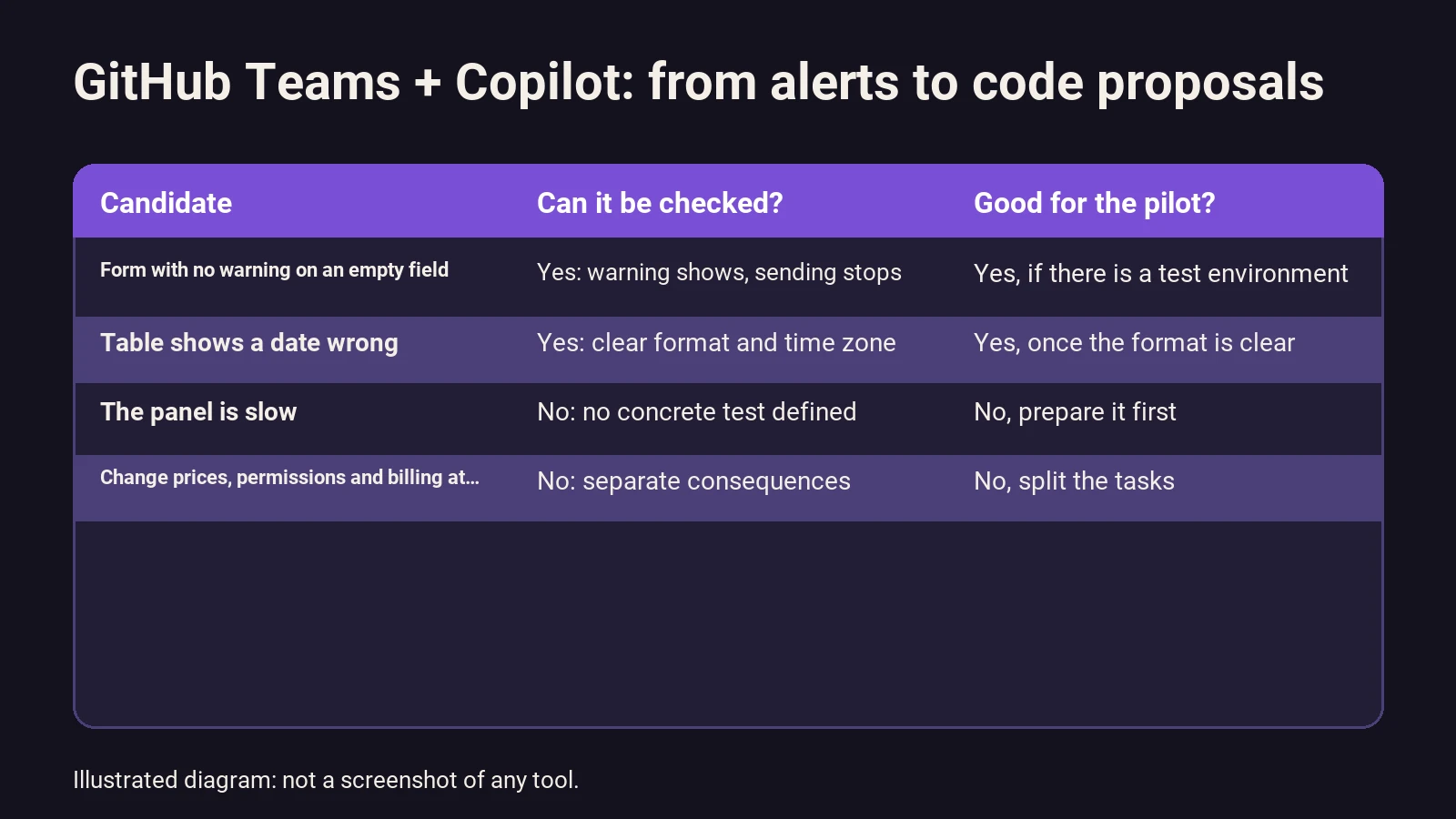
To select a case, use this table as a working guideline:
| Candidate | What can be checked | Decision for the first pilot |
|---|---|---|
| A form does not show a warning when a required field is left empty | The warning appears and incomplete submission is blocked | Good candidate if a test environment exists |
| A table displays a date incorrectly | The same entry is shown as defined | Good candidate if format and timezone are clarified |
| “The dashboard is slow” | No operation or measurement defined | Prepare a concrete test first |
| Change prices, permissions, and charges at once | Several independent consequences | Split the request and review each part |
This table does not describe guaranteed Copilot capabilities. It helps you pick a task whose result you can judge without relying on the agent’s explanation.
Prepare the message: work starts before mentioning the agent
Write an issue that leaves little room for interpretation. State what the person does, what they see, and what should happen. Include a sample input that reproduces the problem. If the bug depends on a browser, date, or specific option, add that.
Here’s a working template for a test form. Adapt it to your actual data and tests:
Problem: the test form allows submitting the “company” field empty.

Repository and affected area: [repository] / [form].
Steps to reproduce:
1. Open the form in the test environment.
2. Fill in the other fields with sample data.
3. Leave “company” empty and click submit.

Observed result: [behavior I have confirmed].
Expected result: show a warning and block the submission.

Propose the minimal change and a test that reproduces the bug.
Explain which files you would modify and what remains to be checked.
Do not publish changes to production or modify other forms.
The key is to fill in “observed result” based on an actual check. If no one has reproduced the bug, the first task should be to investigate, not to apply a solution based on an assumption.
How I would organize a test from start to finish
1. Prepare the initial state
Save the issue and note how the form behaves before any changes. Keep the link to the repository and the test environment. A screenshot can help explain a missing warning, but a short list of repeatable steps will be more useful for checking later.
2. Request a specific action
With the app connected, use the GitHub-documented mention, @GitHub, and add your request. Specify the repository if there’s more than one. The acceptance criteria should be in the message: what you’ll check to consider the problem solved.
Don’t turn the first attempt into a list of pending improvements. If another idea comes up while investigating the form, log it as a separate issue. That way, you can link each change to a specific need.
3. Review the proposed solution
Check that the work matches the chosen repository and problem. Read the summary and code diff. If a small fix includes broad changes, ask for an explanation before proceeding. A long answer does not make up for a change whose scope no one understands.
4. Repeat the test and check what still works
Run the original steps. Then try a valid submission: fixing the empty input should not prevent submitting the form with valid data. Also include any edge case relevant to your business, such as a string made up only of spaces.
5. Decide whether to accept the change
A responsible person compares the results with the request. If anything remains unchecked, it should be recorded before publishing. The GitHub announcement keeps the tasks of reviewing, testing, and merging the proposal with the main code in the team’s hands. The pilot should keep that responsibility visible.
What to review even if the agent says it’s done
My review would have four questions. Does the original problem reproduce? Does the change fix it? Does correct behavior remain? Is the change limited to what was requested? Each answer needs brief evidence: a test, a UI check, or a code explanation.
GitHub offers branch protections that can require reviews and checks before merging changes. Which specific rules you can apply depends on your repository’s settings. Review this with your admin; don’t assume a safeguard is in place just because your team usually reviews.
It’s also worth keeping track of pilot failures. If the agent proposes a fix that passes an overly simple test, the useful result is discovering the test was poorly designed. The next version of the process should include the missing case. That’s a verifiable process improvement, even if the first attempt doesn’t end in a release.
How to assess value without inventing savings
The cost of this approach has several parts: the relevant subscription, usage billed under your plan, time spent preparing issues, and review time. Check the current Copilot plan terms before budgeting. This guide does not assign a price to any account or contract it hasn’t verified.
For time, measure two comparable journeys: from receiving a well-described issue to having an accepted change. Separate working time from waiting time. If someone takes two days to open a proposal, don’t blame that delay on the model or count all waiting as hours saved.
Hypothetical example: imagine twelve small issues per month. Previously, each required twelve minutes of intervention; in the pilot, it drops to eight minutes, including review and corrections. The difference would be forty-eight minutes per month. If preparing and maintaining the process takes another thirty minutes monthly, you’re left with eighteen minutes of net improvement. These are sample numbers, not results from this integration.
That calculation helps you ask an honest question: is it worthwhile for this volume and team? The main value might be better context retention or fewer errors when passing information. If that matters, define how you’ll observe it. Don’t automatically turn it into a profitability figure.
When I’d try it and when I’d prepare another solution
I’d try it with a team that already uses Teams and GitHub, has someone able to review code, and regularly handles small issues with enough information. In that context, you can see if the conversation and proposal are better connected.
If your business receives notifications by email, uses a different tool, or lacks a test environment, I’d start by organizing that process. It may be enough to log the issue, assign a responsible person, and request any missing data. The decision should be based on your business’s actual workflow.
To commission that design, the AI agents for business processes service lets you study which parts an agent can handle and which need a human decision. If the main problem is losing notifications between people, it’s better to review notifications and tracking.
Frequently asked questions
Is it worth it if I can’t review code?
You need to decide who will approve the work. You can coordinate the issue and check visible behavior, but that doesn’t replace a technical review for an app your business uses. For the first pilot, involve the person who maintains that system.
Has the example in this guide been run inside Teams?
No. This is a proposed test with a sample form, based on the documented features. The diagram is an editorial illustration. The integration features are based on the linked official sources; no screenshots or metrics from an actual run are presented.
What should I keep to know if the test went well?
The original issue, the steps that reproduce the bug, the link to the proposal, and the follow-up check. Add prep and review time if you want to compare efficiency. An explanation of what was supposed to happen does not replace the observed result.
How can I learn to prepare these requests?
Start with a small task and practice describing it, checking it, and reviewing a modification. At El Atajo, Academy of IA que trabaja, the learning focuses on AI practices, tools, and automation. Before choosing a specific integration, it’s best to master the process of request, evidence, and review.
Sources
Editorial review: October 24, 2026. The app and its terms may change, especially while the integration is in public preview.
- Official GitHub announcement from October 23: app update and workflow from notification to proposal.
- Copilot in Teams documentation: requirements, connection, and conversation context.
- GitHub branch protections: review and check mechanisms.
- GitHub Copilot plans: check current terms before subscribing.