IA que trabaja
"Automated YouTube channel with AI" is one of those searches where you'll find plenty of people selling "make money while you sleep" courses. Here’s the honest version: what parts of a channel you can really automate, how I do it on my channel, and where the line is that, if you cross it, YouTube will demonetize you.
The Red Line First: "Non-Original" Content
YouTube doesn’t ban AI. What it doesn’t pay for is repetitive or mass-produced content: hundreds of nearly identical videos, templates with synthetic voices reading out texts with no added value, compilations with no original work. In its partner program, YouTube calls this non-original content, and that’s what gets most "automated channels" taken down.
The practical rule I use: AI can do the heavy lifting, but each video needs something unique—a real test, an opinion, your own data, a case study. If your video could have been made by anyone with the same prompt, it has no future.
Also, if a video contains realistic AI-generated content (like a person who doesn’t exist speaking, or a real place altered), YouTube asks you to mark it as altered or synthetic content when uploading. Do it: there’s no penalty, and it saves you trouble.
What Can Be Automated, Step by Step
| Part | Automatable? | Tools | What’s Still Yours |
|---|---|---|---|
| Video ideas | Yes | Competitor analysis + AI | Choosing what fits you |
| Script | Almost all | Claude, ChatGPT, social skill | The angle and your own data |
| Voice | Yes | Free AI voices on your PC | Deciding if it’s your voice or not |
| Editing | Quite a bit | Remotion, CapCut, Descript | The final pacing |
| Thumbnails | Yes, with care | Image generators + your face | Picking the best one |
| Title and description | Yes | AI with your search data | Reviewing them |
| Publishing | Yes | YouTube Studio or its API | Nothing |
| Comment replies | Yes | YouTube API | Sensitive replies |
| Analytics | Yes | YouTube Studio + custom dashboard | Drawing conclusions |
1. Ideas: Copy What Works, Not What You Like
The best source of ideas is what’s already worked for others in your niche in the past few days. I have a dashboard that collects videos from creators I follow every morning and suggests ideas, scored from 0 to 10 based on what’s trending.
Without a dashboard: each week, note which videos grew the most in 5 channels in your niche and give the list to AI, asking what they have in common and what new angle you could bring.
2. Scripting with AI (Without Sounding Like AI)
AI writes a script in seconds. The problem is, it sounds like AI: "dive in," "discover," "in today’s world." Three tricks:
- Give it your best-performing scripts as style examples.
- Ask for the hook for the first 3 seconds separately, with several versions scored.
- Give it a list of banned phrases.
For this, I made a free skill for Claude with modes for scripts, hooks, pacing, and removing the AI feel. It saves you from writing prompts.
3. AI Voice
If you don’t want to use your own voice, there are now free models that sound very natural and run on your own computer, even cloning a voice from just a few seconds of audio. You’ll find step-by-step instructions in the free AI voice guide.
A couple of warnings: don’t clone someone else’s voice without their permission; and a synthetic voice just reading a text is exactly the kind of content YouTube sees as unoriginal. AI voice works when it adds to something with your own value.
4. Automated Editing
- For Shorts with subtitles, editors like CapCut or Descript do most of the work: they cut silences and add subtitles.
- If you want to go further, Remotion lets you assemble videos with code: fixed templates where you only change the text, images, and voice. With an agent like Claude Code, you don’t need to know how to code to use it. My reels with screen captures and animated text are made this way.
- For whiteboard or stick-figure animation videos, you have the free video tools.
5. Thumbnails
The thumbnail decides if people click. AI generates variations in seconds, but be careful: AI-looking thumbnails (glossy, impossible colors, plastic faces) convert worse and worse. What works: your real face, little text, big and centered, and a consistent, recognizable style.
Generate three or four versions, pick one, and if YouTube lets you, test them with the thumbnail testing feature.
6. Scheduled Publishing
With YouTube Studio, you can schedule videos with their title, description, tags, and thumbnail. If you publish a lot, the YouTube API lets you upload and schedule videos automatically, though there’s a daily quota and uploading videos uses up quite a bit.
7. Automatically Replying to Comments
I have this running on my channel. Since YouTube doesn’t have private messages, the reply is public: if someone comments the keyword for the video (for example, "GUIDE"), the system replies to the comment with the link.
How it works under the hood:
- Every few minutes, it reads new comments on my videos using the official YouTube API (connected to my Google account).
- If a comment contains the keyword for that video, it replies with the set message, choosing from several versions to avoid repeating the same thing.
- It doesn’t reply twice to the same person or to anyone I’ve already answered manually.
- It keeps an eye on the API daily quota (reading costs little; each reply costs more) and has a limit on replies per hour.
It’s the same dashboard I use to manage Instagram and TikTok: each rule is a keyword, a video, and a message.
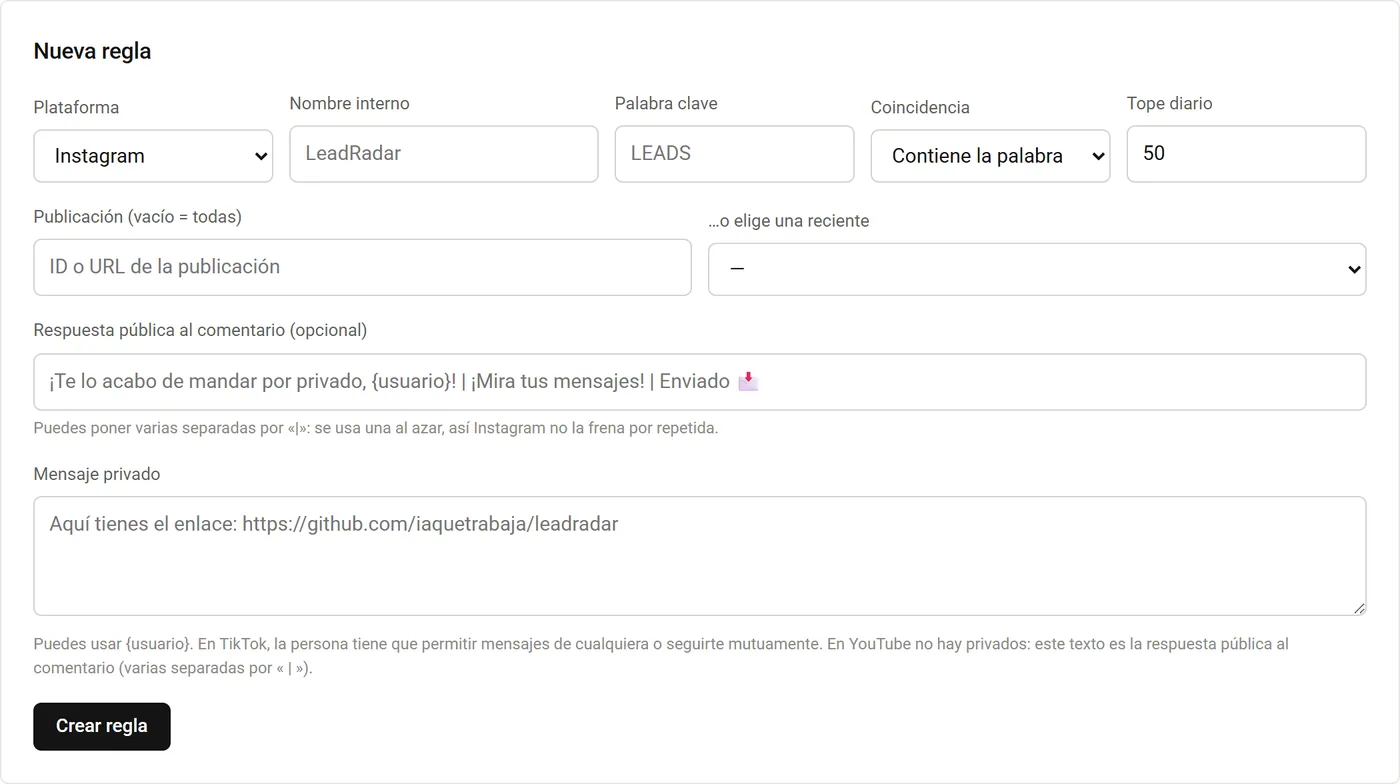
If you want this for your channel, it’s part of the social media automation service. For TikTok, see how to automate TikTok.
8. Analytics
YouTube Studio gives you very good data about your channel. What it doesn’t give you is comparison with your competitors or a summary of what to do next. What I check every week:
- Retention in the first 30 seconds. If people drop off here, the problem is the hook.
- Thumbnail click-through rate. If it’s low, the problem is the thumbnail or the title.
- Which videos bring in subscribers, not just views.
How Much Does an Automated Channel Cost?
You can do it almost for free: script with the free version of a chat, voice with a free model on your PC, editing with CapCut or Remotion, and publishing with YouTube Studio. If you want higher quality or more volume, add an AI subscription (about €20 a month) and, if needed, a paid editor.
What really costs is the time to decide which videos are worth making. No one can automate that.
Frequently asked questions
Can you have a 100% automated YouTube channel?
Technically yes, but channels that publish mass-produced videos with no original input end up demonetized for non-original content. What works is automating production and adding your own judgment and something unique to each video.
Does YouTube penalize videos made with AI?
Not for using AI. It penalizes repetitive or low-value content, and asks you to mark realistic AI-generated or altered content as synthetic.
How can you automatically reply to YouTube comments?
With the official YouTube API connected to your channel: a system reads new comments and replies to those that match a rule (for example, a keyword). You have to respect the API’s daily quota.
What tools do you need to automate a channel?
An AI chat for scripts, a voice generator if you don’t use your own, an editor (CapCut, Descript, or Remotion), an image generator for thumbnails, and YouTube Studio for scheduling. All have free versions.